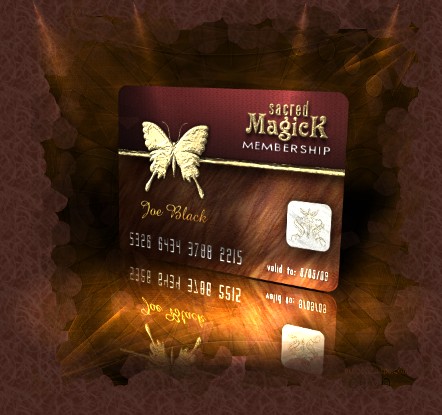
Butterfly is the power animal of Sacred Magick; representing metamorphosis and transformation. Scientific research has shown that the butterfly is the only living being capable of changing entirely its genetic structure during the process of transformation: the caterpillar's DNA is totally different from the butterfly's. Thus, it is the symbol of total transformation. As what Sacred Magick site existence represents; butterfly manifests a need for change and greater freedom, and at the same time it represents courage: one requires courage to carry out the changes necessary in the process of growth. It encourages us to find clarity in the mental processes, and to figure out the next step in our internal and spiritual growth. The larva is the decision to manifest something in the physical world. The cocoon has to do with "going inside", either through insight or the development of ideas. The breaking of the cocoon represents with sharing the splendor of your creation with the whole world. It also represents the birth-death-rebirth circle, mental powers, magick, divination concerning the life cycle, understanding where you are in the cycle of your life where you can discover which is the next step.
Like the butterfly, Sacred Magick Library with membership subscriptions we offers, endeavors to maintain our position as the current number one internet resource to the never-ending cycle of self-transformation - when you are ready to undergo this sort of transformation.
What is Sacred Magick Membership? ▲
Being a Sacred Magick member grants you an instant access to
all of our exclusive library pages, contents, free downloads area and receive
member's periodic emails. Purchasing a paid membership with download credits
enables you to download and access an overwhelming selection of downloads from our
library. Paid membership include bulk
download credit purchase subscription. The more credits you
purchase in a single transaction, the more greater the value for
you (a lot cheaper in the long run).
What do I get with a
paid membership?
▲
Download credits that you get
with your Membership (platinum, priority, premium and basic
subscription) allows you to access over five thousands documents, audio, and various occult, spiritual and personal
development courses that is rare, very hard to find and many are
exclusive only to our library. Our
collections are also
updated periodically. For more
information about various subscriptions benefits we offers, please click here.
One other way to getting a Sacred
Magick Membership is to get a Free Membership if you
would like to consider in upgrading your account later.
Please click here to sign up
(Paid membership with download credits)
If you don't have a free membership:
1. Go to the
Free registration page and fill out the form,
starting with your user-name and password.
2. Once you finish the registration, you can login to your account
where you will see "UPGRADE" function on your member's page.
Select your upgrade and follow this link to the secure server.
3. On the secure server, enter your credit card information. Once
payment completed, your account will automatically upgraded and
you can start your downloads immediately.
If you already have a free membership:
1. Be certain that you are signed-in under your username. You know
are you signed-in when you see your name on the member's page,
where it says "Welcome..." If you are not signed-in, visit the
login page and enter your username and password.
2.
Login to your account where you will see "UPGRADE" function on
your member's page. Select your upgrade and follow this link to
the secure server.
3. On the secure server page, enter your credit card information. Once
payment completed, your account will automatically upgraded and
you can start your downloads immediately.
Login
to your account and browse the library. Point and click your cursor over
any file you want.
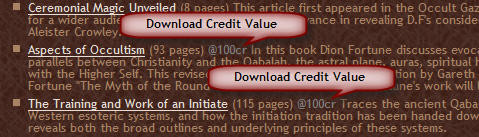
Download credits is a prepaid credits you purchased with
your membership in order to successfully download available collections from our library. Each download less than 20MB costs
50cr -
unless marked by a unique grey value next to the link. Files with
more than 20MB of size can be downloaded for
100cr each.
Files with more than 100MB can be downloaded for
@250cr. Please read
Download Guide for more information.
Screenshot:
Why do I get corrupted or unsuccessfully downloads? ▲
Download credits with any paid membership is needed to download full working files, and you
must be logged in to your account to complete your download successfully. If you
have a paid membership,
logged in and still getting problem with a file you tried to
download,
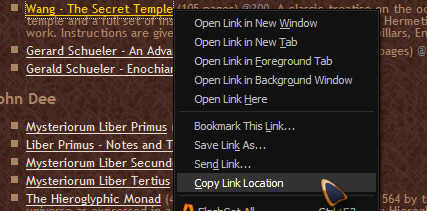
please "copy link location" of the file you are trying
to download, then copy & paste the link into an email
to us and
we'll fix it A.S.A.P. Be certain to include your username in
your email to get a proper evaluation of your problem.
Screenshot:
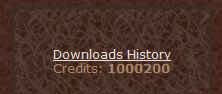
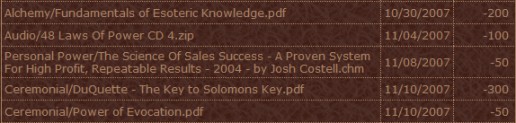
Download History is a feature of a paid account which allows you
to review files you have downloaded, when it was downloded and credit balance during the lifetime
of your account. You can access your Download History from your
member's page.
Screenshot:
To begin using the wishlist feature successfully, you must first login. Once you have an account, log in
to begin adding books to your wishlist
by clicking on the star button
 "add to wishlist" link that accompanies each file listing.
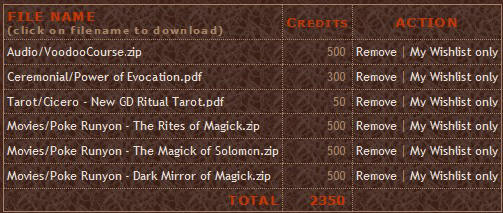
To view your wishlist, click on the "my wishlist" link. Using wishlist page you can view and remove items from your wishlist
to calculate total credits needed for downloads.
"add to wishlist" link that accompanies each file listing.
To view your wishlist, click on the "my wishlist" link. Using wishlist page you can view and remove items from your wishlist
to calculate total credits needed for downloads.
Wishlist Screenshot:
What is Future Upgrades Feature? ▲
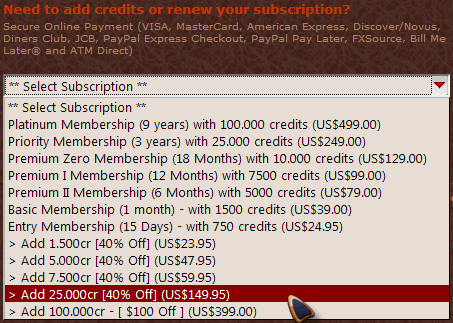
Future Upgrades is included with all Premium, Priority and Platinum subscriptions; it offers discounted price for future subscription purchase during the active period of your paid subscription. Members with the largest initial download credit purchase on a single sale is automatically rewarded with larger credit upgrade discounts accordingly. For example, members with an active Platinum Membership account (see screenshot below) will receive 40% upgrade discounts option for all download credit purchases.
Screenshot:
How can I renew, add download credits and upgrade my membership? ▲
Once you become a paid member and want to add download
credits to renew your account, you can click on the
'Member' on any navigational links found on this site.
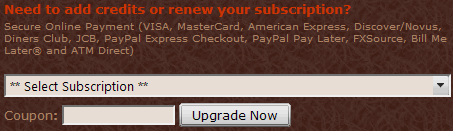
When you're on your member's page, select a subscription upgrade from the drop down
options to add credits or subscription to your account or to renew with.
From there our secure payment system will quickly guide you
through the rest of our easy and fast upgrade process.
Screenshot:
Once my membership is expired
will I still be able to access downloads with my credit balance?
▲
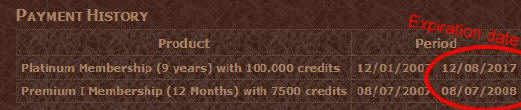
No. When your account expire, access to your
account or to your remaining download credits will be
automatically closed. You must renew your
account by upgrading your subscription BEFORE your account
expiration date (see screenshot below) to "carry over" your remaining
credit balance with any upgrades option of your choice. Example:
if you have 100 credit balance remaining on any old subscriptions,
upgrading your account with a new
5000 credits will add a working credit balance totals of 5100
credits to your account.
See above on how to upgrade your account.
Screenshot:
Will my subscription renewed
automatically?
▲
No, you must manually renew your subscription. An upcoming
expiration notice will be emailed to the email address you
provided us before your account expires. Please also
see above for more information.
I paid for my membership but
why I
have not received any details of my account?
▲
This never happened ever. But if it ever does please click here to send us an
email and we will be happy to help you to access your account
quickly! Be certain to include your
receipt and username in your email. Please note that payment with
online/digital check will only be processed until payment are cleared.
Help! I'm being locked out of
the member's page!
▲
If you have an account and you still cannot access member's
features, there are several possible explanations.
1. You're not logged in. The first thing to check is that you are
actually logged-in. One way to find out if you are signed-in is to
visit the homepage.
REMEDY: If you find that you are not signed-in, please visit the
login page. If you don't know your password, you can have it
emailed to you from our Password Retrieve page.
2. You're signed-in under the wrong account. Some people, perhaps
by accident, register more than once to Sacred Magick. Whatever
account you were signed-in as when you paid for premium service is
the account which will be activated. If you sign-in under a
different account than the one you activated for premium service,
you will not be able to access premium services.
REMEDY: Sign-in under your premium account, and stop using your
non-premium account. If you are not sure what the username of your
premium account is, consult the email that we sent you when you
first signed-up for premium services.
3. Your membership has expired.
REMEDY: Create a new account. You can add more access time and download credits to your account
by visiting your member's page. As always, be sure you are
signed-in to your account.
4. There is a problem with your payment. Occasionally, customer
will ask their bank to cancel and reverse a charge for our premium service
they have subscribed, and one-sided payment cancellation for any
products are considered as Consumer Fraud. It is our policy to
deactivate the account until we communicate with the account
holder. If no communication and settlement be established from the
account holder, then their IP will be added to our black list and
they will no longer be able to access our site.
REMEDY: Contact us and we will do
our best to identify and rectify the problem. The simplest method
to correct a canceled-charge is simply to correct the canceled
payment.
5. There is a technical problem with your browser. Some browsers
are configured to show you old versions of pages instead of new
ones. This is done through a mechanism called a "cache" which is a
great benefit if properly implemented but creates enormous
problems when it don't behave properly. AOL users are particularly
vulnerable to this kind of technical problem.
REMEDY: The easiest remedy is to press the "reload" button on your
browser (some browsers require "shift-reload") when you receive an
error message. If the error message suddenly vanishes, then you
know that it was a cache problem. Unfortunately, this doesn't
always work. It may be possible to venture into the "options" area
of your browser configuration and clear the cache files. Other
solution includes use of different browser which is available on
the internet for free.
If none of these remedies solve your problem, please
contact us.
Be certain to include details of the problem and your username in your email.
Please email us or open a ticket with your enquiries. We monitors our email several times in a day (including weekends & holidays) and our response time is usually within 12 hour and often a lot faster! Rest assured you will be well taken care of!
My question isn't listed
here
▲
If you require personal assistance, please
send your questions to
us and we will try to solve whatever problem you might be
experiencing. We want you to get the most out of your Membership.
Be certain to always include your username or file name path in your email to help
us locate any problem with your account.